 Town of Pelham, New Hampshire
“A two-hour board meeting used to mean about five hours of work for me. We had those minutes finished in twenty-five minutes, and that was the first set I ever built in the tool.”
Motions written the way minutes should read
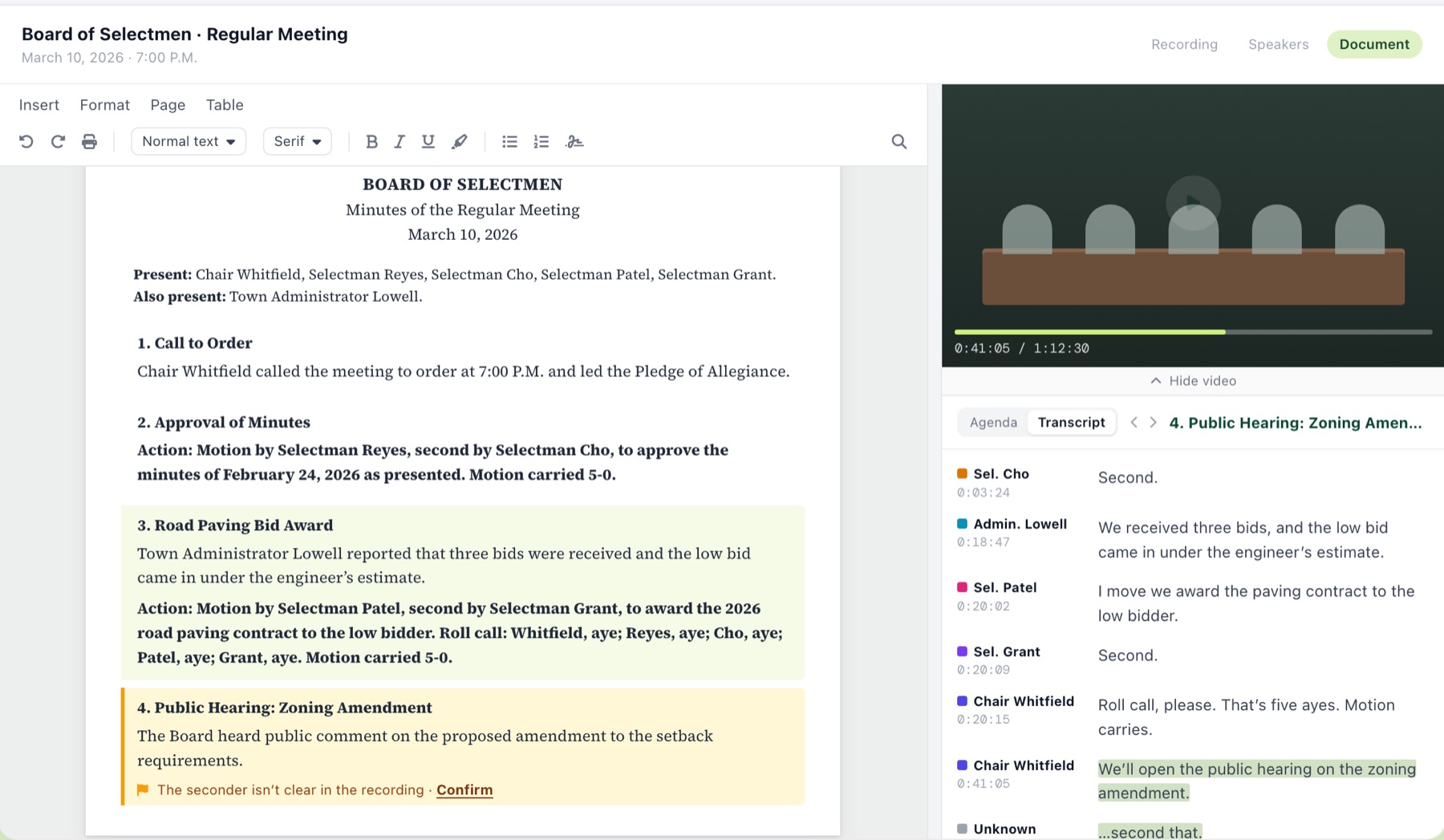
The motion is the part of the minutes that matters most, and it is where Govably shines. Every motion is written out in full: who moved it, who seconded it, the motion language, and the vote with each member's name under ayes, nays, abstentions and absent, followed by the result. Clerks tell us the motions screen is the moment Govably clicks for them.
Item 7. Award of the 2027 street resurfacing contract.
MOTION by Council Member Davis, seconded by Council Member Ruiz, to award the 2027 street resurfacing contract to Smith Paving, the lowest responsive bidder, and authorize the Mayor to sign the agreement.
Motion carried, 4 to 1.
Because Govably knows each member's voice, the mover and seconder are the people who actually spoke. You check the motion at a glance instead of scrubbing the recording to confirm who said "so moved."
“I looked at the comparisons that you had, based on actual minutes and the AI minutes, and they are right on.”
VoicePrint: it knows who's talking, and remembers next month
Govably's VoicePrint technology identifies who is speaking and keeps a VoicePrint for each of your board members. Confirm a member once, and at the next meeting they are already named. Every speaker you confirm makes the match better. There is no cap on how many speakers a meeting can have.
With ClerkMinutes, speaker labels are suggested for each meeting and confirmed by you each time. With Govably, the people who sit on your board every month are simply named.
Finish the minutes in one tool, not several
Govably has a full document editor. You read, edit and finish the minutes right where they were written, in your house style: your headings, your phrasing, your format for actions. Then publish to your public portal. No copying between programs and no reformatting at the end.
Your Client Success Manager has written minutes
An off-the-shelf tool is yours to figure out. Govably comes with a Client Success Manager who has local government experience and has written minutes. They set up your format and your board members, review your first meetings with you, and stay with you after that. We let actual intelligence check the artificial intelligence.
Review only what needs you
Govably places each item of business on the meeting's timeline and tells you how sure it is. Most items land where they belong. You review the handful it flags as uncertain, instead of rereading the whole meeting to find the one mistake.
A public portal residents can click through
Publish to your public portal and residents can view each meeting's minutes and recording, search the transcript, and click any line to jump to that moment in the recording.
“If you are following along on your computer or your phone, you can click on the time associated with that particular period and watch just that part of the meeting instead of having to scrub through it to find where they are speaking. The searchability is important. The reliability is important.”
Paste any link
Govably takes the link to your recording and pulls the audio itself: YouTube, Zoom, Vimeo, Granicus, Swagit, TelVue, Cablecast or CivicPlus. If your recording is a file, upload it. Nothing to download, convert or re-upload.
Side by side
The ClerkMinutes column is based on its public website as of August 2026.
| GovablyRecommended | ClerkMinutes | |
|---|---|---|
| Approach | Govably finishes the minutes, and your Client Success Manager, who has written minutes, sets up your format and stays with you. | Off-the-shelf: run a recording or transcript through it and get an AI draft to finish yourself. |
| What you get back | Finished minutes in your house style, ready to approve and file. | An AI draft of the minutes. |
| Motion formatting | Every motion written out: mover, seconder, motion language, each member's vote by name (ayes, nays, abstentions, absent) and the result. | Motion and second notation in the draft. |
| Speaker identification | VoicePrint identification, with unlimited speakers. | AI-suggested speaker labels. |
| Speaker memory | A VoicePrint for each board member. Confirm once; named automatically at every meeting after, and more accurate with each confirmation. | Speakers labeled at each meeting. |
| Where the minutes get finished | In Govably's full document editor. One tool, not several. | Exported and finished by the clerk in another program. |
| Review | Exception-based: Govably flags only the items it is unsure of. | Read and correct the draft. |
| Public portal | Published minutes and recordings; residents search the transcript and click any line to jump to that moment. | Publish documents to your website. |
| Recording sources | Paste a link from YouTube, Zoom, Vimeo, Granicus, Swagit, TelVue, Cablecast or CivicPlus, or upload a file. | Upload audio or video; supports Zoom and YouTube recordings. |
Test it on your own meeting
- Pick a recent meeting with a few motions, a roll call and some cross-talk.
- Send us the link and get your first minutes free. We write them and walk you through them on a quick intro demo.
- Check the record: every motion written out, the right mover and seconder, every member's vote attributed by name.
- Time how long it takes to get each version ready to file. That is the number that matters.
Govably publishes this page. Everything stated about ClerkMinutes comes from its public website and is accurate to the best of our knowledge as of August 2026. Vendors change their products; verify anything decision-critical with the vendor directly. Found something wrong? Email team@govably.com and we will correct it.